
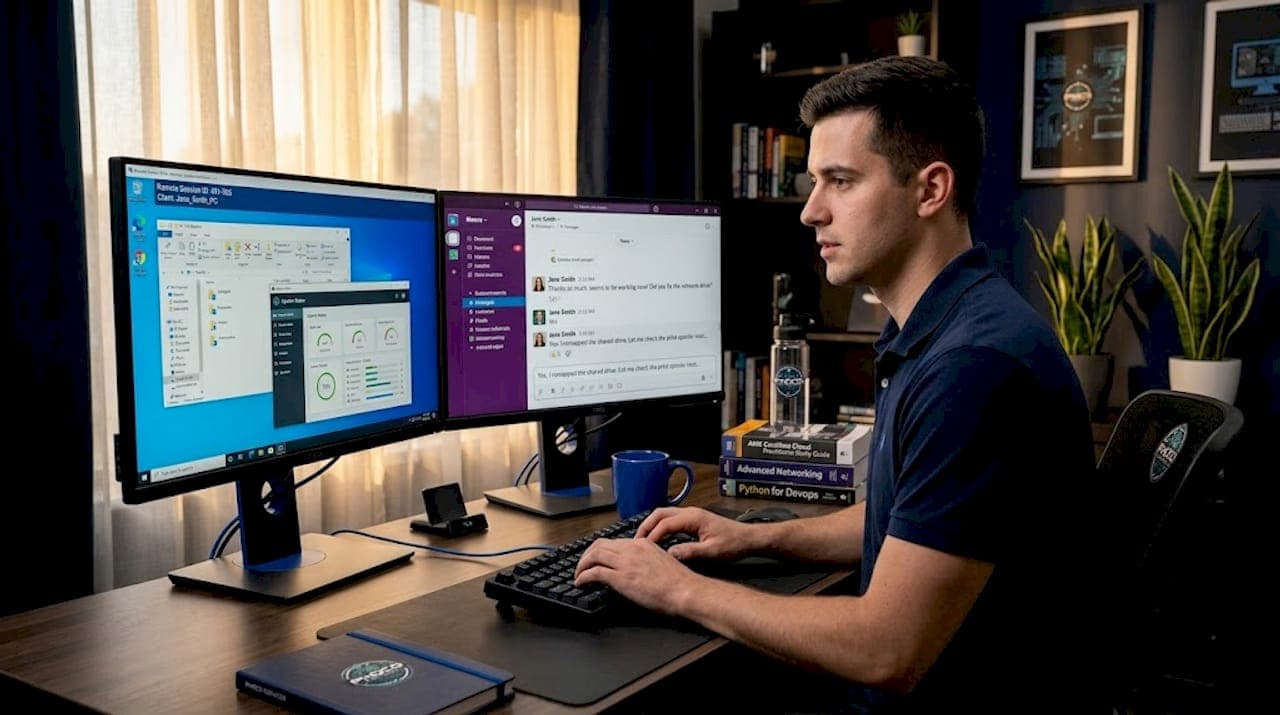
When your system crashes mid-workday or your network goes down without warning, the type of remote IT support you have in place determines how fast you recover. Understanding the different types of remote IT support services is not optional for businesses that depend on technology. It shapes your response time, your security posture, and your bottom line. This guide breaks down each major category, explains how they work in practice, and gives you a clear framework for choosing the right mix for your situation.
Table of Contents
- Key takeaways
- How to evaluate types of remote IT support services
- 1. Attended remote support
- 2. Unattended remote support
- 3. Screen viewing support
- 4. Remote help desk services
- 5. Cloud infrastructure management
- 6. Network monitoring and management
- 7. Cybersecurity and threat detection
- 8. Data backup and disaster recovery
- Comparing the core service types
- My take on building a remote IT support strategy
- Get the right IT support for your business
- FAQ
Key takeaways
| Point | Details |
|---|---|
| Three core service types | Remote IT support divides into attended, unattended, and screen viewing categories covering most business scenarios. |
| Security shapes your choice | Authentication requirements and session logging differ significantly across service types and should match your compliance needs. |
| Hybrid models outperform single-type setups | Combining remote and onsite support handles both software issues quickly and hardware problems thoroughly. |
| Provider retention signals quality | Providers with long-term client relationships consistently deliver better reliability and accountability. |
| Matching tools to infrastructure gaps | No single monitoring tool covers everything; pairing endpoint and network tools achieves full visibility. |
How to evaluate types of remote IT support services
Before you commit to any provider or service model, you need a clear picture of what your operation actually requires. Not every business in Lawton, Oklahoma has the same demands. A two-person accounting firm and a 50-person logistics company need very different things from their IT support.
Here are the core criteria to weigh when evaluating your remote IT assistance options:
- Response time and availability. Do you need 24/7 coverage, or is business-hours support sufficient? Some providers offer tiered response times based on issue severity.
- Security and authentication. Enterprise tools like Microsoft Intune require technician and user authentication through Entra ID, and some cannot support external or guest users at all. Know what your compliance requirements demand before selecting a platform.
- Scope of support. Clarify whether the provider covers software, hardware diagnostics, network issues, and user training, or only a subset of those areas.
- Scalability and geographic coverage. If your team grows or operates across multiple locations, your provider needs to scale with you. Large enterprises often need months to onboard remote IT help desk services due to infrastructure complexity.
- Integration with existing systems. Your remote support tools should connect with your ticketing platform and ITSM software to avoid workflow fragmentation.
- Pricing model. Per-device, per-user, and flat-rate pricing all carry different cost implications depending on your growth trajectory. Review IT support pricing structures before signing any contract.
- Provider reputation and client retention. 70% of a major provider's clients stay with them for over 10 years. Long-term retention is one of the clearest signals of consistent service quality.
Pro Tip: Ask any prospective provider for their average client tenure before discussing pricing. A provider that retains clients for years is almost always a safer bet than one competing purely on cost.
1. Attended remote support
Attended remote support is the most familiar type for most users. A technician connects to your device in real time while you are present and watching. You grant permission, the session begins, and the technician can see and control your screen to diagnose and fix the issue directly.
According to Splashtop's breakdown of remote support types, attended, unattended, and screen viewing sessions cover the majority of remote support scenarios for both individuals and businesses. Attended sessions are the go-to for immediate troubleshooting, software configuration, and situations where the user needs to observe the fix for future reference.
Common use cases for attended remote support include:
- Real-time troubleshooting. A user reports a software error, and the technician resolves it live without needing to be in the room.
- User training. The technician walks through a process while the user watches, making it ideal for onboarding new employees to specific tools.
- Sensitive account work. Because the user is present and can see every action, attended sessions work well for tasks involving financial software or personal data.
The main limitation is availability. If the user is unavailable or the issue needs to be resolved outside business hours, attended support is not the right fit. It also requires a stable internet connection on both ends to maintain a smooth session.
2. Unattended remote support
Unattended remote support allows a technician to access a device without the user being present. Sessions are either scheduled in advance or triggered automatically by a monitoring alert. This is the backbone of proactive IT management.
The practical value here is significant. A technician can push software updates across 200 workstations at 2 a.m. without waking a single employee. Patch management, system cleanups, configuration changes, and automated remediation all happen in the background.
Key use cases and considerations:
- Automated patching and updates. Devices stay current without requiring user downtime during business hours.
- Proactive monitoring and remediation. When a monitoring tool detects an anomaly, an unattended session can trigger an automatic fix before the user even notices a problem.
- Off-hours maintenance. Scheduled tasks run when the business is closed, keeping productivity hours clean.
- Security logging requirements. Every unattended session should generate a detailed log. This is non-negotiable for compliance-conscious businesses.
Pro Tip: Always require session recording for unattended access. If a security incident ever occurs, those logs are your first line of evidence and your clearest path to resolution.
Security is the biggest concern with unattended access. Without a user present to verify activity, strong multi-factor authentication and strict access controls are mandatory. Enterprise-grade remote support requires this level of identity management to prevent unauthorized access.
3. Screen viewing support
Screen viewing is a distinct category where the technician can see the user's screen but cannot take control of it. This might sound like a limitation, but it serves a specific and valuable purpose.
Screen viewing enables guidance on restricted devices like iOS, where direct remote control is not permitted by the operating system. A technician can observe exactly what the user sees and provide step-by-step verbal or written instructions to resolve the issue.
This approach works well in several scenarios:
- Mobile device support. iPhones and iPads do not allow full remote control, so screen viewing fills that gap.
- Onboarding and coaching. New employees can share their screen while a trainer guides them through a process without taking over.
- Privacy-sensitive environments. Some organizations prefer that technicians never have direct control over user devices, making screen viewing the only acceptable mode.
The obvious drawback is that the technician cannot directly fix anything. Every action depends on the user following instructions correctly. For complex technical issues, this can slow resolution significantly. Screen viewing is best used as a complement to other support types, not a replacement.
4. Remote help desk services
The remote IT help desk is the human layer of IT support. It is the team or service that users contact when something goes wrong, whether through a phone call, chat, email, or ticketing system. The help desk triages issues, handles first-level resolution, and escalates to deeper technical resources when needed.
What separates a strong remote help desk from a weak one is integration. Context-switching between ticketing systems and remote support tools reduces productivity significantly. The best setups embed remote access directly into the ITSM platform so technicians never have to leave their workflow to connect to a user's device.
For businesses in Lawton and surrounding areas, a well-structured remote help desk means faster ticket resolution, better documentation of recurring issues, and a cleaner path to identifying systemic problems before they become outages.
5. Cloud infrastructure management
As more businesses move workloads to platforms like Microsoft Azure, AWS, or Google Cloud, managing that infrastructure remotely has become its own specialized service category. Cloud management support covers provisioning, monitoring, cost optimization, and security configuration of cloud environments.

This is not the same as general IT support. A technician managing your cloud infrastructure needs to understand resource scaling, identity and access management, and cost controls specific to your cloud provider. For small and mid-size businesses, outsourcing this to a managed service provider is often more cost-effective than hiring a dedicated cloud engineer.
6. Network monitoring and management
Network monitoring is one of the top remote monitoring IT services businesses rely on for continuous uptime. It involves watching your routers, switches, firewalls, and connected devices around the clock for performance issues, unusual traffic, or hardware failures.
No single best RMM tool exists for every situation. Endpoint RMM tools handle desktops and servers well, while network-centric tools address switches, routers, and other infrastructure devices that endpoint agents cannot reach. Many businesses combine both to get full coverage.
Network monitoring tools use agentless protocols like SNMP and ICMP for device discovery and traffic analysis, which means they can monitor devices that do not support installed software agents. This is particularly useful for businesses with mixed hardware environments. Phocoservice provides network support in Lawton, OK for businesses that need this level of coverage without building an in-house team.
7. Cybersecurity and threat detection
Remote cybersecurity support covers a range of services: vulnerability scanning, threat monitoring, incident response, and security audits conducted entirely without an onsite visit. This category has grown substantially as ransomware and phishing attacks have become more frequent and more targeted at small businesses.
A remote cybersecurity provider can monitor your endpoints and network traffic for suspicious behavior, alert your team when something looks wrong, and in many cases, isolate a compromised device before the threat spreads. The key distinction from general IT support is specialization. Cybersecurity support requires dedicated expertise and tools that most general IT providers do not carry.
8. Data backup and disaster recovery
Backup and disaster recovery services protect your data and restore operations after a failure, whether from hardware breakdown, ransomware, or accidental deletion. Remote providers manage backup schedules, verify that backups are completing successfully, and execute recovery procedures when needed.
Remote IT support handles software and configuration issues quickly but hardware repairs require onsite presence. This distinction matters for disaster recovery planning. If a server physically fails, remote support can restore data to a new system, but someone still needs to handle the physical hardware. Knowing this boundary upfront prevents costly surprises during an actual incident.
Comparing the core service types
| Service type | Best for | Key requirement | Limitation |
|---|---|---|---|
| Attended remote support | Live troubleshooting, training | User availability | Cannot run off-hours |
| Unattended remote support | Patching, automation, maintenance | Strong authentication | Security logging mandatory |
| Screen viewing | Mobile devices, coaching | User cooperation | Cannot directly fix issues |
| Remote help desk | Issue triage and escalation | ITSM integration | Depends on staffing quality |
| Network monitoring | Uptime, infrastructure health | Agentless protocol support | Requires tool combination |
| Cybersecurity support | Threat detection, incident response | Specialized expertise | Higher cost than general IT |
| Backup and disaster recovery | Data protection, business continuity | Verified backup schedules | Physical hardware still needs onsite help |
My take on building a remote IT support strategy
I've worked with enough businesses to know that the biggest mistake is treating remote IT support as a single purchase rather than a layered strategy. Most organizations pick one provider, sign a contract, and assume they are covered. They are not.
In my experience, the businesses that recover fastest from IT incidents are the ones that combine attended support for user-facing issues with unattended access for background maintenance. Those two layers alone handle the majority of day-to-day problems. Adding network monitoring on top catches the issues that neither layer would catch on its own.
The security piece is where I see the most shortcuts taken. Unattended access without session logging and multi-factor authentication is genuinely dangerous. I've seen businesses discover months later that a compromised credential had given an unauthorized party persistent access to their systems through an unattended remote tool. The fix is straightforward, but only if you build those controls in from the start.
One more thing: a hybrid approach of remote and onsite support consistently outperforms either model alone. Remote support is fast and cost-effective for software problems. Onsite support is irreplaceable for hardware. Build your strategy around that reality, and you will spend less time recovering and more time running your business.
— Michael
Get the right IT support for your business
If you are a business or individual in southwest Oklahoma trying to figure out which IT support services actually fit your situation, Phocoservice is worth a direct conversation.
Phocoservice serves Lawton, Elgin, Duncan, Cache, Altus, Frederick, and surrounding communities with same-day repair and IT support backed by over 15 years of certified technician experience. Whether you need network monitoring, cybersecurity help, data recovery, or hands-on device repair for computers, phones, or gaming consoles, the team handles it with transparent pricing and a one-year warranty on all repairs. Explore the full range of repair and IT support services to find the right fit, or check out network support in Elgin, OK if your business needs dedicated infrastructure coverage in that area.
FAQ
What are the main types of remote IT support services?
The three core types are attended remote support, unattended remote support, and screen viewing. Beyond those, specialized services include remote help desk, network monitoring, cybersecurity support, and data backup and recovery.
How do I choose the right IT support service type?
Start by identifying your biggest pain points: user-facing issues, background maintenance, network uptime, or security. Match each need to the corresponding service type, and consider a provider that offers multiple types under one contract.
Is unattended remote support secure?
It can be, provided the provider enforces multi-factor authentication, session logging, and strict access controls. Without those safeguards, unattended access carries real security risk.
What is the difference between remote help desk and remote monitoring?
A remote help desk responds to issues users report. Remote monitoring proactively watches your systems for problems before users notice them. Most businesses benefit from having both.
Can remote IT support replace onsite support entirely?
No. Remote support is limited to software and configuration issues. Hardware failures, physical installations, and infrastructure upgrades still require an onsite technician.