
Most businesses treat servers like appliances. They set them up and expect them to run indefinitely without much thought. That assumption is where costly outages, security breaches, and data loss begin. Understanding what is server maintenance means recognizing it as a structured, ongoing discipline, not a one-time setup task or occasional fix. Server maintenance covers everything from hardware inspections and software patching to backup validation and security hardening. The consequences of skipping it are real, and for businesses in Lawton, Oklahoma and beyond, getting this right is the difference between reliable operations and expensive emergencies.
Table of Contents
- Key takeaways
- What is server maintenance and why it's essential
- Security hardening, patching, and backup best practices
- Scheduling and operational discipline
- Tools and automation that reduce human error
- Practical server maintenance checklist
- My perspective on disciplined server maintenance
- How Phocoservice can support your server maintenance strategy
- FAQ
Key takeaways
| Point | Details |
|---|---|
| Server maintenance is proactive | It covers hardware checks, patching, backups, and security hardening on a regular schedule. |
| Downtime carries serious financial risk | Unplanned outages can cost thousands per minute, far exceeding the cost of preventive maintenance. |
| Security requires ongoing enforcement | Patch management, CIS Benchmarks, and configuration controls must be applied and re-verified continuously. |
| Scheduling and phasing reduce failure risk | Layered maintenance windows and phased deployments protect against widespread system failures. |
| Automation prevents human error | Infrastructure as Code tools enforce consistent baselines and reduce manual mistakes across server environments. |
What is server maintenance and why it's essential
Server maintenance is a proactive, ongoing process that keeps your systems reliable, secure, and performing at their best. It is not the same as monitoring, which simply observes server behavior, and it differs from general management, which covers broader IT operations. Maintenance means taking deliberate, scheduled action to prevent failures before they occur.
What does server maintenance include? At its core, it covers four major areas:
- Hardware inspections: Checking physical components like drives, memory, cooling systems, and power supplies for signs of wear or failure
- Software updates and patching: Applying operating system patches, firmware updates, and application fixes to close security gaps and improve stability
- Backup and recovery validation: Creating and testing backups to confirm that data can actually be restored when needed
- Security hardening: Tightening server configurations to reduce the attack surface and close unnecessary access points
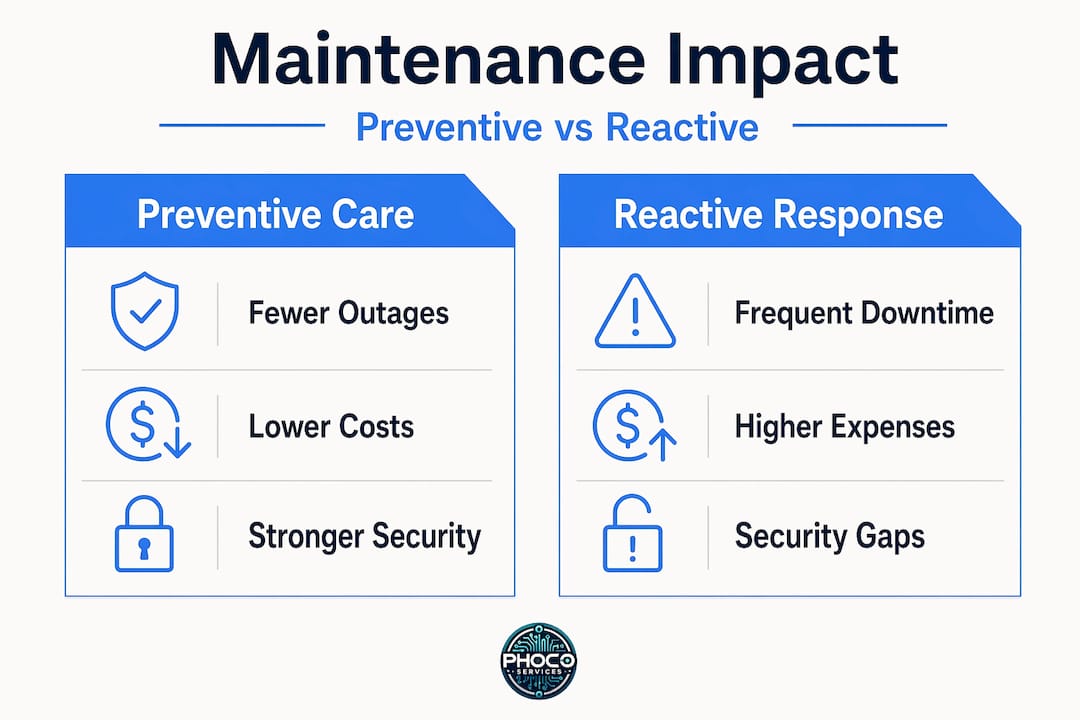
The importance of server maintenance becomes undeniable when you look at the cost of ignoring it. Downtime can cost $5,600 per minute depending on the industry. A single unplanned outage lasting even 30 minutes can wipe out an entire maintenance budget for the year. Beyond direct financial loss, downtime disrupts employees, impacts customers, and can trigger compliance violations.
Recovering from unplanned outages is consistently more expensive than the preventive maintenance that would have avoided them. That asymmetry is the core argument for treating server maintenance as an operational priority rather than a reactive response.
The foundation of good maintenance is a layered schedule. Daily quick checks flag emerging issues early. Weekly performance reviews catch trends before they become outages. Monthly patching cycles address security vulnerabilities on a predictable timeline. Each layer catches what the previous one might miss.
Security hardening, patching, and backup best practices
Security is not a one-time configuration. It degrades over time as new vulnerabilities emerge, configurations drift, and software ages. This section covers the technical tasks that directly protect your servers from threats.
Security hardening with a proven baseline
The most reliable starting point for security hardening is CIS Level 1 controls. CIS Benchmarks are vendor-agnostic, consensus-based guidelines covering operating system settings, account policies, network configurations, and more. Applying these controls to a production server creates a documented, defensible security baseline. Without a baseline, there is no way to detect configuration drift, which is when systems quietly move out of a secure state through updates, manual changes, or software installs.

The 72-hour patch rule
Patch management is one of the most critical server upkeep procedures you can formalize. The 72-hour patch rule mandates that critical vulnerabilities be patched within three days of disclosure to limit exposure. Speed of detection and containment matters as much as the patching itself. Network segmentation limits how far an attacker can move even when a vulnerability exists, which is why patching and segmentation work together rather than as substitutes.
Pro Tip: Set up automatic security-only updates for critical patches and reserve manual review for cumulative or feature updates. This keeps your exposure window tight without risking stability from untested feature changes.
Backup disciplines that actually work
Many teams discover their backup strategy was broken only during a real recovery event. The 3-2-1 backup rule provides a reliable structure: three copies of data, stored on two different media types, with one copy stored off-site. However, having three copies of corrupt or incomplete data offers no protection. Restoring backups in isolated environments is the only way to confirm true recoverability. Automated restore tests run on a scheduled basis enforce this practice without relying on manual follow-through.
Scheduling and operational discipline
Knowing what to do is only half the equation. Executing maintenance consistently under real operational pressure requires structure. Here is how to build a schedule that holds up in practice:
- Daily health checks: Review disk usage, CPU load, error logs, and backup completion reports each morning. Anything outside normal thresholds gets flagged immediately, not at the end of the week.
- Weekly performance reviews: Analyze trends across key metrics, review security event logs, and confirm patching status. This is the right time to catch slow-building issues like gradual disk fill or creeping memory pressure.
- Monthly patch windows: Apply operating system updates, firmware patches, and application fixes in a pre-approved maintenance window scheduled outside business hours. Communicate the window to stakeholders in advance.
- Phased deployments: Never patch all nodes simultaneously. Using pilot-staging-production rings catches update failures in low-risk environments before they reach production. This single practice has prevented more outages than almost anything else.
- Rollback documentation: Every maintenance action should have a documented rollback plan. If something breaks during a patch cycle, your team should be able to reverse it quickly without improvising under pressure.
Microsoft recommends aligning patching with business calendars and SLA expectations, coordinating updates around application dependencies and user activity patterns. Clustered workloads require node-by-node patching to maintain high availability throughout the process.
Pro Tip: Assign a named owner to each maintenance task. When everyone is responsible, no one is. Ownership creates accountability and makes post-incident analysis far easier.
Tools and automation that reduce human error
Manual maintenance processes fail at scale. Human error in scheduling, forgetting to verify a backup, or applying a patch to the wrong server group creates the exact problems you are trying to prevent. Automation addresses this directly.
Ansible, Terraform, and PowerShell DSC represent the core of modern infrastructure maintenance. Infrastructure as Code prevents configuration drift and enables fast, repeatable recovery. PowerShell DSC specifically allows continuous enforcement of security baselines, automatically remediating settings that drift out of compliance. This means your server's security configuration does not quietly degrade between maintenance windows.
Here is a quick comparison of common maintenance automation approaches:
| Approach | Best for | Key benefit |
|---|---|---|
| Ansible | Cross-platform patching and config | Agentless, readable playbooks |
| Terraform | Infrastructure provisioning | Consistent, versioned environments |
| PowerShell DSC | Windows baseline enforcement | Continuous compliance checking |
| Group Policy (GPO) | Windows domain servers | Centralized policy without custom scripting |
For monitoring, the goal is symptom-based alerting rather than raw metric alerts. Alerting on a CPU spike every time it crosses 80% creates noise. Alerting when a service becomes unavailable or a job fails to complete catches real problems. This distinction reduces alert fatigue and improves the team's ability to respond to signals that actually matter.
Continuous improvement cycles treat incidents and near-misses as learning opportunities. Blameless post-mortems examine what failed in the process without assigning personal fault, which encourages honest reporting and faster operational improvement. Building runbooks from these sessions turns hard-won lessons into repeatable, transferable procedures.
Practical server maintenance checklist
A well-built server maintenance checklist keeps your team consistent across shifts and environments. Use this as a starting reference:
Daily tasks:
- Check disk space on all volumes (alert threshold: 80%)
- Review backup completion logs
- Scan system and application event logs for errors or warnings
- Verify critical services are running
Weekly tasks:
- Analyze performance trend data for CPU, memory, and disk I/O
- Review security event logs for unusual access patterns
- Confirm patch compliance status across all servers
- Test at least one backup restore in a non-production environment
Monthly tasks:
- Apply approved patches within the scheduled maintenance window
- Review and update firewall rules and access control lists
- Audit user accounts and disable any that are inactive
- Run hardware diagnostics on physical servers
Common pitfalls to avoid are just as important as the checklist itself. Patching all servers simultaneously is a frequent mistake that turns a manageable update into a full-scale outage. Ignoring restore tests means backups exist on paper but not in practice. And alert fatigue from poorly tuned monitoring causes real incidents to be missed.
Pro Tip: Send a stakeholder notification at least 48 hours before any scheduled maintenance window. Include expected duration, affected systems, and a contact for urgent issues. This simple habit prevents support calls, reduces frustration, and builds trust with the teams depending on your infrastructure.
My perspective on disciplined server maintenance
I've spent years watching teams treat server maintenance as something to do when things slow down. The pattern almost always ends the same way: a preventable failure that becomes a crisis, followed by expensive reactive work that a structured schedule would have avoided entirely.
What I've learned is that the gap between reliable operations and frequent firefighting is almost never technical knowledge. Most teams know what needs to be done. The gap is discipline. Maintenance needs owners, schedules, and written rollback plans before anything touches production.
The blind spots I see most often are configuration drift and incomplete rollback documentation. A server that was hardened six months ago may no longer meet its baseline because of a software install or manual tweak. Without continuous enforcement through tools like PowerShell DSC, no one notices until an audit or incident surfaces it.
Proactive lifecycle management is what separates teams that achieve near-100% uptime from those perpetually reacting to the next failure. Blameless post-mortems are not a soft culture exercise. They are an operational mechanism that surfaces the real causes of failures and turns them into prevention. Teams that run them consistently get better. Teams that skip them repeat the same incidents.
— Michael
How Phocoservice can support your server maintenance strategy
Maintaining a server environment properly takes time, tools, and expertise that not every business in Lawton, Oklahoma has available in-house. Whether you manage a small business network or oversee a growing IT infrastructure, having a reliable partner for the complex or time-sensitive maintenance tasks makes a real difference.

Phocoservice offers professional repair and IT support services covering hardware diagnostics, data recovery, patch management support, and backup validation. Certified technicians with over 15 years of experience handle the technical work with the same discipline this article describes, backed by a one-year warranty on repairs. For businesses that need network support and server uptime on a consistent basis, Phocoservice provides options built around your operational needs. Explore managed IT service plans to find the right level of support for your environment.
FAQ
What is server maintenance, exactly?
Server maintenance is a structured, ongoing set of tasks that keeps servers reliable, secure, and performing correctly. It includes hardware inspections, software patching, backup testing, and security configuration, performed on a scheduled basis.
How often should server maintenance be performed?
Effective server maintenance follows a layered schedule: daily health checks, weekly performance reviews, and monthly patching cycles. Critical vulnerabilities should be addressed within 72 hours of disclosure, regardless of the regular schedule.
What does server maintenance include for security?
Security-focused maintenance includes applying CIS Benchmark controls as a baseline, patching vulnerabilities within defined windows, auditing user accounts, and continuously enforcing configuration settings to prevent drift.
Why is server maintenance necessary for businesses?
Unplanned downtime can cost thousands of dollars per minute, and recovering from an outage is significantly more expensive than the maintenance that prevents it. Regular server maintenance also protects against security breaches and compliance failures.
What is the 3-2-1 backup rule in server maintenance?
The 3-2-1 rule means keeping three copies of data on two different media types, with one copy stored off-site. The critical addition is regularly testing restores in an isolated environment to confirm the backups are actually recoverable.